Linear Regression
Application of the Week: Imitation Learning with Dynamical Movement Primitives and Linear Regression
Dynamical Movement Primitives (DMPs) are trajectory representations that
- are goal-directed
- are robust to perturbations and noise (like potential fields)
- are arbitrarily shapeable
- can be scaled and translated arbitrarily, even online
- are parametrized policy representations that can be used for reinforcement learning
- can be used for imitation learning
DMPs consist of superimposed movements:
- a goal-directed movement
- an arbitrarily shapeable "forcing term"
- obstacle avoidance
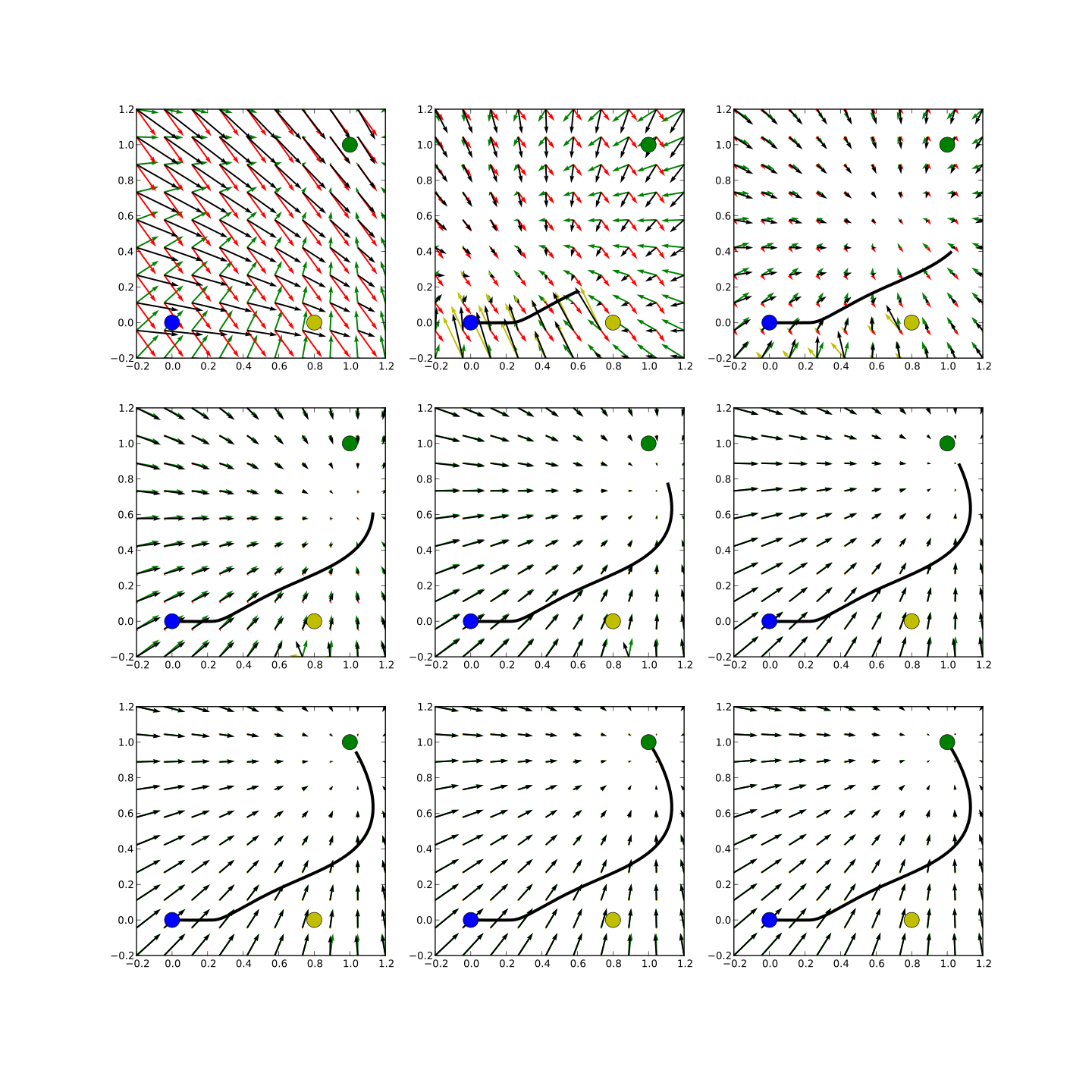
Superimposed Movements
The forcing term can be learned from demonstrations (e.g. from human demonstrations) by linear regression.

Imitation Learning
# Enable inline plots, import NumPy and Matplotlib
%pylab inline
# Fix seed for random number generator to make the results repeatable
random.seed(0)
# Pretty matrix outputs
numpy.set_printoptions(precision=3, threshold=1000, edgeitems=5, linewidth=80, suppress=True)
Linear Regression
- We have a training set \(T = \{(x^{(n)}, y^{(n)}) | n \in \{1, \ldots, N\}\}\) of
- samples drawn from an unknown function \(f: \mathbb{R}^D \rightarrow \mathbb{R}\)
- with additional Gaussian noise.
- \(x^{(n)}\) is an input of the unknown function.
- \(y^{(n)}\) is the corresponding desired output (target).
- We want to estimate the mapping.
Example
Dataset: line + noise
# Training set:
N = 5                                           # Size of the data set
X = linspace(0.0, 1.0, N).reshape((N, 1))       # Inputs, shape: N x 1
y = linspace(7.0, -5.0, N) + 2*random.randn(N)  # Outputs, shape: N

print("X =")
print(X)
print("y =")
print(y)

# Test set:
N_test = 100
X_test = linspace(0.0, 1.0, N_test).reshape((N_test, 1))
y_test = linspace(7.0, -5.0, N_test) + 2*random.randn(N_test)
plot(X[:, 0], y, "o")
#plot(X_test[:, 0], y_test, "o")
xlabel("x")
ylabel("y")

Linear Model
- We can write our constraints down with a linear model: \[\forall n \in \{1,\ldots,N\}:\quad x^{(n)T} \boldsymbol{w} = y^{(n)} + \epsilon^{(n)},\] where \(\boldsymbol{w}\) is a weight vector and \(\epsilon^{(n)} \sim \mathcal{N}(0, \sigma^2)\).
- Weights are parameters of the linear model that can be tuned to fit the training data better.
- A shorter version of this expression is the following equation: \[\boldsymbol{X} \cdot \boldsymbol{w} = \boldsymbol{y} + \boldsymbol{\epsilon}, \qquad \boldsymbol{X} \in \mathbb{R}^{N \times D}, \boldsymbol{y} \in \mathbb{R}^N, \boldsymbol{\epsilon} \in \mathbb{R}^N, \boldsymbol{w} \in \mathbb{R}^D,\] where the \(n\)-th row of \(\boldsymbol{X}\) represents \(x^{(n)}\) and the \(n\)-th entry of the vector \(\boldsymbol{y}\) represents \(y^{(n)}\).
- It might not be possible to find a weight vector that satisfies the constraints perfectly. Instead, we can minimize the sum of squared errors (SSE): \[\hat{\boldsymbol{w}} = \text{argmin}_\boldsymbol{w} \dfrac{1}{2}||\boldsymbol{X}\boldsymbol{w} - \boldsymbol{y}||^2_2,\] where \(||\boldsymbol{A}||_2\) is called Frobenius norm and is the generalization of the Euclidean norm for matrices.
Learning Weights
There are two ways to adjust the weights of a linear model (which includes linear models with nonlinear features):
- Normal equations (analytical solution), requires inversion of \(D \times D\) matrix, i.e. does not scale well with the number of features
- Gradient descent (iterative solution), requires the calculation of \(N\) gradients in each step, i.e. does not scale well with the number of examples
In addition, we can add a constraint to the objective function to penalize large weights:
- Tikhonov regularization
Normal Equations
Solving the equation \(\boldsymbol{X} \cdot \boldsymbol{w} = \boldsymbol{y}\) directly for \(\boldsymbol{w}\) by inversion is not possible, because \(\boldsymbol{X}\) is not necessarily a square matrix, i.e. \(\boldsymbol{w} = \boldsymbol{X}^{-1} \boldsymbol{y}\) is usually not possible. In addition, it is usually not possible to find an exact solution. Instead, we find the least squares solution, which is the solution of
\[\boldsymbol{X}^T\boldsymbol{X} \hat{\boldsymbol{w}} = \boldsymbol{X}^T\boldsymbol{y}\]
for \(\hat{\boldsymbol{w}}\), i.e.
\[\hat{\boldsymbol{w}} = (\boldsymbol{X}^T\boldsymbol{X})^{-1}\boldsymbol{X}^T\boldsymbol{y}\]
Hint: The expression \((\boldsymbol{X}^T\boldsymbol{X})^{-1}\boldsymbol{X}^T\) is equivalent to the Moore-Penrose pseudoinverse \(\boldsymbol{X}^+\) of \(\boldsymbol{X}\). It is a generalization of the inverse for non-square matrices. You can use this to implement normal equations if your library provides the function. You could also use a least squares solver (e.g. numpy.linalg.lstsq or dgelsd/zgelsd from LAPACK).
def normal_equations(X, y):
    #w = linalg.inv(X.T.dot(X)).dot(X.T).dot(y)
    # ... or we can use the Moore-Penrose pseudoinverse (is usually more likely to be numerically stable)
    #w = linalg.pinv(X).dot(y)
    # ... or we use the solver
    w = linalg.lstsq(X, y)[0]
    return w

# Add bias to each row/instance:
# x11 x12 ...          x11 x12 ... 1
# x21 x22 ...   --->   x21 x22 ... 1
# .                    .
# .                    .
# .                    .
X_bias = hstack((X, ones((N, 1))))
X_test_bias = hstack((X_test, ones((N_test, 1))))
w = normal_equations(X_bias, y)
plot(X_bias[:, 0], y, "o")
plot(X_bias[:, 0], X_bias.dot(w), "-", linewidth=3)
xlabel("x")
ylabel("y")
title("Model: $y = %.2f x + %.2f$" % tuple(w))

Question 1
- inputs: 100 images of size 256x256 pixels
- output: radius of the ball which is at the center of the image
- Is the direct solution via normal equations the fastest solution?
Answer 1
n_pixels = 256 * 256
memory_size_xtx = n_pixels * n_pixels * 64/8
print("%d GiB" % (memory_size_xtx / 2**30))
Inversion is an operation that requires \(O(n^{2.373})\) operations (Source).
Gradient Descent
Update \(\boldsymbol{w}_t\) incrementally:
\[\boldsymbol{w}_{t+1} = \boldsymbol{w}_t - \alpha \nabla \boldsymbol{w}_t,\]
where
- \(\alpha\) is a hyperparameter called "learning rate", it has to be set manually and must usually be within \(]0, 1[\), typical values are 10e-1, 10e-2, 10e-3, ...
- \(\nabla \boldsymbol{w}_t\) is the gradient of \(\boldsymbol{w}_t\), i.e. the \(i\)-th entry of \(\Delta \boldsymbol{w}_t\) is the derivative of the error function \(E(\boldsymbol{X}, \boldsymbol{y};\boldsymbol{w}_t)\) with respect to the weight \(w_i\): \[\Delta {\boldsymbol{w}_t}_i = \frac{\partial E(\boldsymbol{X}, \boldsymbol{y};\boldsymbol{w}_t)}{\partial {w_t}_i}\]
Gradient descent actually is a more general rule that can be applied to any minimization problem if the gradient can be computed (e.g. for artificial neural networks, support vector machines, k-means, ...).
Gradient of the Linear Model
Error function: sum of squared errors (SSE) \[E(\boldsymbol{X}, \boldsymbol{y};\boldsymbol{w}) = \frac{1}{2}||\boldsymbol{X} \cdot \boldsymbol{w} - \boldsymbol{y}||^2_2\]
Gradient \[\nabla \boldsymbol{w} = \nabla_{\boldsymbol{w}} E(\boldsymbol{X}, \boldsymbol{y};\boldsymbol{w}) = \boldsymbol{X}^T \cdot (\boldsymbol{X} \cdot \boldsymbol{w} - \boldsymbol{y})\]
Question 2
- Why don't we always choose a very small learning rate?
- Your implementation of gradient descent oscillates between two error values. What could be the cause?
Question 3
- How can we make linear models nonlinear?
Answer 3
- Nonlinear projection of features (e.g. polynomial regression)
- Kernel trick (e.g. SVR, SVM, ...)
- Mixture of experts (e.g. locally weighted regression, locally weighted projection regression, Gaussian mixture regression, ...)
- Learn nonlinear features (e.g. artificial neural networks)
Approximation of Nonlinear Functions (with a Linear Model)
To approximate nonlinear funtions with a linear model, we have to generate nonlinear features. In this example, we generate sinusoidal features. You could also try radial basis functions, polynomials, ...
We expand each feature \(x\) to the nonlinear feature vector \((\cos(\frac{0}{d} \pi x), \cos(\frac{1}{d} \pi x), \ldots, \cos(\frac{d}{d} \pi x))^T\), where \(d\) is the number of basis functions. Note that \(\cos \left(\frac{0}{D} \pi x \right)=1\) is the bias we added manually in the previous example.
def sinusoidalize(X, n_degree):
    X_sinusoidal = numpy.ndarray((len(X), n_degree+1))
    for d in range(n_degree+1):
        X_sinusoidal[:, d] = numpy.cos(X[:, 0] * numpy.pi * d / n_degree)
    return X_sinusoidal

# Utility function
def build_sinusoidal(n_degree, w):
    from itertools import chain
    # That does not look readable but it works :)
    return ((("%+.2f \sin(%d /" + str(n_degree) + " \pi x)") * (n_degree+1)) % tuple(chain(*zip(w, range(n_degree+1)))))

n_degree = 4
X_sinusoidal = sinusoidalize(X, n_degree=n_degree)
X_test_sinusoidal = sinusoidalize(X_test, n_degree=n_degree)
w_sin = normal_equations(X_sinusoidal, y)
plot(X_bias[:, 0], y, "o")
#plot(X_bias[:, 0], X_bias.dot(w), "-", linewidth=3) # Uncomment to compare with linear approximation
plot(X_test_bias[:, 0], X_test_sinusoidal.dot(w_sin), "-", linewidth=3, color="r")
xlabel("x")
ylabel("y")
title("Model: $y = " + build_sinusoidal(n_degree, w_sin) + "$")

Question 4
- How can we make a model more general?
Answer 4
- Get more training data.
- Generate artificial training data:
- Add noise to your training data
- Example for object recognition: scale, rotate, distort images, select random samples from a bigger image, corrupt image, ...
- Prefer simple models (e.g. degree of polynomial)
- Penalize large weights, for example
- quadratic values of weights
- absolute values of weights
- ...
- Average different models (ensemble methods)